Player’s guide
Gravity Slingshot Courier, explained.
Everything a new courier needs: how to throw, when to nudge, what counts as docking, what every hazard does, how the 3D stages work and what the stars, medals and badges ask of you. No stage solutions here, only how the game works.
What Courier is
Gravity Slingshot Courier is a physics puzzle that runs in your browser, with nothing to download. You fly a small shuttle with a crate of medical supplies in its hold, and the shuttle has no engine. You pull back a slingshot, let go, and coast across the gravity of strange worlds, with a couple of tiny nudges to correct your path, until you reach the station slowly enough to dock before the deadline runs out.
There are 45 stages in nine sectors. The last fifteen, stages 31 to 45, leave the flat plane and are played in three dimensions, and the last five also bring in hidden wormholes and docking thrusters. After them waits a bonus sector for completionists, the Archive, with five more stages. Every stage has stars to win, an optional bonus medal and a ghost of your best run, and there are 42 badges for the challenges you overcome. It is a single-player game, there is no hurry until you launch, and a failed throw costs you only a press of R. Stages 1 to 10 are free, and the full game is a one-time purchase: see Free stages and the full game.
What you need: a recent Chrome, Edge, Safari or Firefox on a computer with WebGL, and a mouse or trackpad. A touch screen also works (one finger aims, and the nudge buttons on the screen do the rest), but the game is made for a computer.
Getting started
Coming in from Oakenhearth
Press Play Gravity Slingshot Courier. You land in stage 1, First Light, with a contract on the screen. Stage 1 is a free trial: no account and no email. When you have delivered it, the game offers a free Oakenhearth account to go on with:
- Create an account: an account name, your email address and a password. We email a six-digit code that works for 15 minutes (look in your spam folder if it does not come), and you are in.
- Sign in, if you already have an account. It is the same Oakenhearth account that works in Thornwick. Forgot your password? emails a code to the address you confirmed.
Until you have an account, stages 2 to 50 show a padlock in the stage list and in the little stage chips at the bottom right. With a free account stages 2 to 10 open, in any order, and the stars you earned in this browser as a guest join your account. Stages 11 to 50 are the full game, explained in the next section.
Your first throw

- Read the contract. The banner, INCOMING CONTRACT, says what to deliver and where. It fades when you begin to aim, and I brings it back.
- Press and drag backward, away from where you want to go, anywhere on the screen. A band stretches behind your ship and a dotted line shows the path.
- Line the dotted line up so it curves past the planet and on toward Kepler Station. Hold Shift for a finer aim.
- Let go. The ship coasts, and the deadline clock starts only now.
- If you drift off line, press Space for a nudge, a short push along your direction of travel.
- Arrive inside the station’s glowing ring, slower than the dock speed shown at the top left. DELIVERED! means you have docked.
Free stages and the full game
The first ten stages, the first two sectors, are free. The rest of the game is one purchase.
| Stages | What you need | Cost |
|---|---|---|
| Stage 1 | Nothing: no account, no email. | Free |
| Stages 2 to 10 | A free Oakenhearth account. | Free |
| Stages 11 to 50 | The full game, on your account. It has every stage from sector 3 on, all fifteen 3D stages included, and the bonus sector, the Archive. | $4.99, once |
When you finish stage 10, or press a padlocked stage after it, the game offers Unlock the full game. The Buy button opens the seller’s own page (we use Stripe) in a new tab, where you pay: your card details never come to us. Your receipt comes from Link, Stripe’s checkout service, and your card statement shows LINK.COM* and the name of the game. Leave the game open in its own tab: it unlocks by itself a few seconds after the payment goes through (it also checks the moment you come back to the tab, and a game page you open or reload right after paying keeps checking for a while), and it stays unlocked on your account in every browser you sign in to. If it has not unlocked after a few minutes, reload the page, and if it still has not, write to us from the contact page.
- One payment, no subscription.
- Your account is in the link the game sends you to, so the purchase goes to the account you were signed in as, whatever email address you pay with. If you bought from the seller’s page without going through the game, pay with the email address of your Oakenhearth account, or write to us from the contact page and we will match it.
- Refunds. If it is not for you, ask within 14 days of buying and you get all your money back, no questions asked: write to us from the contact page.
- A refund, or a payment your bank takes back (a chargeback), takes the full game away again and keeps the stars you saved.
Controls
Courier is played with the mouse and a handful of keys. The nudge keys and the arrows do a second job while you aim a 3D stage (they tip the throw instead), which is explained further down.
| Action | Keys | What it does |
|---|---|---|
| Throw | ||
| Aim and launch | Left mouse | Press anywhere, drag backward, let go to launch. |
| Fine aim | Shift | Hold while you drag: the pull moves at a quarter of the speed. |
| Cancel the aim | Esc Right mouse | Let go of the throw without launching. |
| Pitch, a degree at a time (3D stages) | ↑ ↓ | While aiming. Hold to keep going. |
| Pitch, three degrees at a time (3D stages) | E Q | While aiming. E tips the throw up and Q tips it down. |
| Nudges, in flight | ||
| Boost | Space W ↑ | A short push along your direction of travel. |
| Brake | S ↓ | The same push against your direction of travel. |
| Steer left | A ← | A weaker push to the side, which also turns the ship. |
| Steer right | D → | |
| Up (3D stages) | E | A push straight up. |
| Down (3D stages) | Q | A push straight down. |
| Docking thrusters, in flight (stages 41 to 45) | ||
| Push along the map | W A S D ↑ ← ↓ → | Hold for a steady push forward, back, left or right along the map, for as long as the fuel lasts. These stages have no nudges. |
| Rise or sink | E Q | Hold for a steady push straight up or straight down. |
| Stage | ||
| Restart | R | Instantly, at any moment. |
| Next stage, or retry | Enter | On the results panel. |
| Read the contract again | I | While you are aiming. Clicking the stage name does the same. |
| Stage list | Tab | Every sector, with your stars and medals. |
| Jump to a stage | 1 to 9 | Stages 1 to 9. The chips at the bottom right reach the others, and so does the stage list. |
| Badges | B | Open or close the badge shelf. |
| Hangar | H | Open or close the Hangar, where badges unlock looks for the shuttle. |
| Ghost of your best run | G | Show or hide it. |
| Camera and view (3D stages) | ||
| Follow the ship | F | Give the camera back to the ship, or take it where it is. |
| Reset the view | V | Follow the ship again, with the zoom back to normal. |
| Zoom | + - | The wheel and a trackpad pinch do it too. |
| Pilot view | P | Show or hide the little window with the view from the ship’s nose. |
| Music and sound | M | On or off, and the choice is remembered. |
The camera on a 3D stage has more controls, with the mouse and the trackpad: see The third dimension.
Aiming and launching
A throw has one input, the pull. Press anywhere, drag backward, and the ship will fly the opposite way. The direction of the pull is your heading, and its length is your speed: the longer the pull, the faster the throw, up to a top speed of 40 wu/s (wu is a world unit, the game’s own measure). The Launch figure at the top right and the coloured bar under it show the power as you pull. A pull that is too short is treated as never mind, and Esc or a right click lets go without launching.
Hold Shift while you drag for a fine aim: the pull then moves at a quarter of the speed, which is just what the tight stages ask for.
The dotted line
The dotted line is not a guess. It is flown with exactly the same physics as the real flight, so it bends round every planet, and it puts the moons, the tumbling rocks and the moving stations where they will be when you get there. What it does not show is the whole flight: it covers only the first seconds, between about 2 and 5 depending on the stage. Aim, look at where the line is heading and what lies beyond its end, and keep your nudges for the rest.
The clock does not run while you aim, so take as long as you like.
Reading the grid
The glowing grid under the ship dips round every world: the deeper the dip, the harder the pull. A ship that falls into a dip speeds up, and one that climbs out of it slows down. A planet can only slow you by making you climb out of its well, so a slow arrival is usually planned from the start.
Nudges
Nudges are the only engine you have. Each one is a very short burst that changes your speed by about 4 wu/s. A stage gives you two nudges, and a few give you just one: Courier’s Gambit and three stages of the Archive. The five stages of the last sector give you none: they have docking thrusters instead. The little dots at the top right show how many are left, and so does the hint line at the bottom.
- Boost pushes along your direction of travel and brake pushes against it.
- Steer left and steer right push sideways, at 70% of the strength, and turn the ship.
- On the 3D stages up and down push straight up and down.
Not every stage allows every kind. The first five stages have only boost, brake arrives with stage 6, steering with stage 9, and up and down with the 3D stages. The nudge buttons at the bottom left of the screen show only the ones the stage allows, with the key under each name, and you can click or tap them instead of using the keys.
A nudge is a small thing, so use it for a correction, not a rescue. It is also worth something in itself: three stars want you to finish with one or two nudges unused.
The Far Side: fog and docking thrusters
The last sector, The Far Side (stages 41 to 45), changes two things. Nothing else in the game does either.
Wormholes you cannot see through
On these stages the far end of a wormhole is hidden in a bank of fog, the lavender mist you will see on the map. Nothing in it is drawn: not the worlds, not the station, not the other mouth, and the dotted aiming line stops at the mouth you are lining up. The fog fills the whole volume, so nothing hides above or below it either, and you will not know how high the far side lies. Your first try is a blind jump.
Go in and the ship is drawn into the mouth, shrinking and stretching as it goes, while the clock stands still. A flash, and it comes out of the other mouth, the fog clears from that point outwards, and FAR SIDE CHARTED appears. From then on that far side is yours: it stays charted in this browser, so your next tries show it and the dotted line carries on through the mouth. The pilot view shows the trip as a rush down a tunnel.
Docking thrusters
These stages give you no nudges. Instead you can hold W A S D or the arrow keys for a steady push, and fly the last stretch by hand. A few things to know:
- The push is along the map, and with E and Q straight up or down, whichever way the ship is heading, and it is gentle: you steer a little and brake a little.
- The FUEL gauge at the top right takes the place of the nudge dots. Fuel is seconds of burning: it runs down while a thruster pushes, and a diagonal (two keys) pushes just as hard as one and costs the same. Let go and it costs nothing. When it is empty, the thrusters are dead.
- The stars and the bonus medal count the fuel you have left, not nudges. The contract says how much.
- On a touch screen the FWD, BACK, LEFT, RIGHT, RISE and SINK buttons at the bottom left do the same, and you hold them.
A way to think about it: the throw and the wormhole still do most of the work. The thrusters are for the last stretch: line up with the station, then take the speed off. The station’s label tells you your speed against the limit as you close in.
Docking and the clock
To dock you must be inside the station’s capture ring and slower than the stage’s dock speed. The limit is on the contract at the top left (dock safely) and runs from 8 to 26 wu/s on different stages. The speed readout at the top right is the number to compare it with. Arrive too fast and the screen says OVERSHOT! and you keep flying, so you may still get a second chance by coming round again.
Some stations are on the move. When a depot orbits, the dock speed is measured relative to it, so what counts is how fast you are going compared with the station, not compared with the stars.
The deadline
Every stage has a deadline, from 11 to 42 seconds. The clock sits at the top centre and starts counting down at the moment you launch. Ship still flying when it reaches zero and you get Out of time.
Several drops
Some stages have more than one station, the depots. You deliver to each in one flight, and a message such as DROP 1 OF 2 tells you that one is done, with a Drops count at the top right. On some stages the depots must be done in order: the later ones wait until the earlier ones are finished.
What ends a flight
- Crashed into a planet or moon, or Hit a rock.
- Swallowed by a black hole.
- Cargo shattered, on a stage with fragile cargo.
- Lost in space: you flew out of the playfield. A warning, LEAVING THE PLAYFIELD, flashes before it happens.
- Out of time.
Press R at once to try again. After a delivery the results panel offers Retry and Next level.
The screen

- The contract. The stage’s number and name, what one, two and three stars ask for, and the Bonus challenge, which wins a medal. Click the name, or press I while aiming, to read the contract again.
- The buttons. STAGES opens the stage list, BADGES the badge shelf, HANGAR the Hangar and PILOT the pilot view. Badges you have earned sit just under them as small medallions.
- The deadline. The time left. It shows the whole allowance until you launch.
- Nudges, speed and cargo. The dots are your nudges (on the stages with docking thrusters, a fuel gauge instead). Launch shows the power of your pull while you aim and becomes Speed in flight. Altitude appears on 3D stages, Drops on stages with several depots and Cargo, with a strain bar, when the crate is fragile.
- The nudge buttons. BOOST, BRAKE, LEFT and RIGHT, and UP and DOWN on 3D stages, but only the ones this stage allows, each with its key. On the docking-thruster stages they are the six thruster buttons, which you hold.
- The hint line. The keys that matter right now, and how many nudges you have left.
- The stage chips. Click one to jump to that stage. Your stars show under each, and a padlock marks a stage that is waiting for a free account or, from stage 11, for the full game.
The worlds carry their names beside them. When the station is off the screen, an arrow at the edge points to it and says how far away it is. The ♪ button turns the music and sound on or off and the ⤴ button shares the game. Short messages flash in the middle of the screen: DELIVERED!, OVERSHOT!, DROP 1 OF 2 and the like.
Stars, medals and the ghost

Stars
Every stage is worth up to three stars, 135 in the nine sectors (the Archive adds 15 more):
| Stars | What it takes |
|---|---|
| ★ | Dock within the speed limit. |
| ★★ | Dock with enough time left on the clock. The contract says how much. |
| ★★★ | Dock with more time left, and with one or two nudges unused (on a docking-thruster stage, with fuel left over). The contract says how many. |
The game keeps your best result on every stage. Your stars show in the stage list and under each stage chip.

Bonus medals
Each stage has one optional extra challenge, the bonus (shown with a diamond, ◆, in the contract). Win it and the diamond stays lit in the stage list and counts toward badges. It is always one of these seven kinds:
| Kind | What it asks |
|---|---|
| Near miss | Skim a world: pass within 1.5 times its radius of its centre, without crashing. Some stages ask for two. |
| Thrifty | Deliver without using a nudge. |
| Gentle | Dock below a speed the contract names, lower than the limit. |
| Speedy | Finish the flight in less than the time the contract names. |
| Intact | Keep fragile cargo above a percentage the contract names until you dock. |
| Clean | Come in without an OVERSHOT! on the way. |
| Fuel | Dock with at least the seconds of fuel the contract names still in the tank (the docking-thruster stages). |
The ghost
On every stage you have delivered, a ghost of your best run flies alongside your new throw, so you can see where you gained or lost. G shows or hides it. Ghosts are kept in the browser they were flown in.
Hazards
Planets and moons are where it starts. Each pulls on you, and a dip in the grid shows how hard. Touch one and you crash. Moons go round on their own orbits, and the dotted line already knows where they will be. The rest of the game is made of the things below. Every one has a badge, and most are introduced on their own, in a stage built around them, before they are mixed with the others.
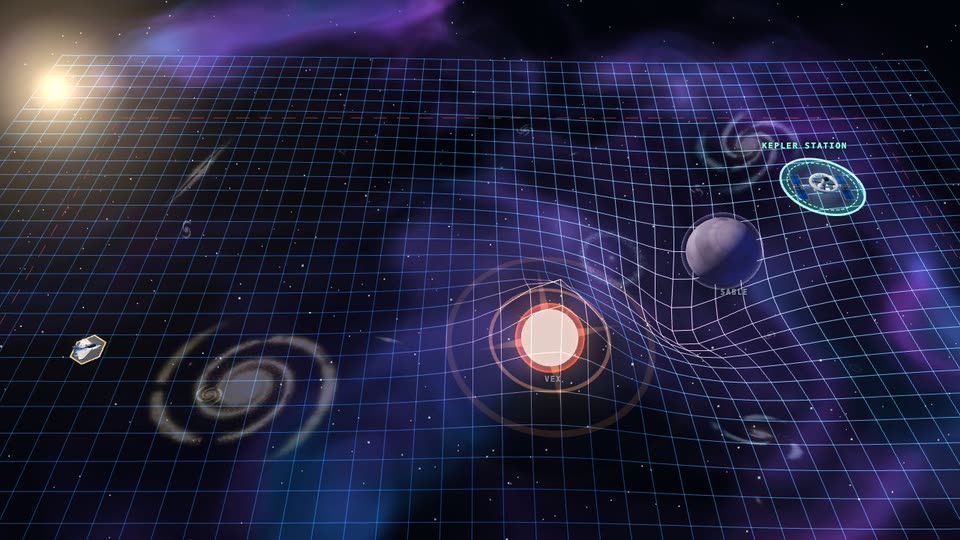
A repulsor star 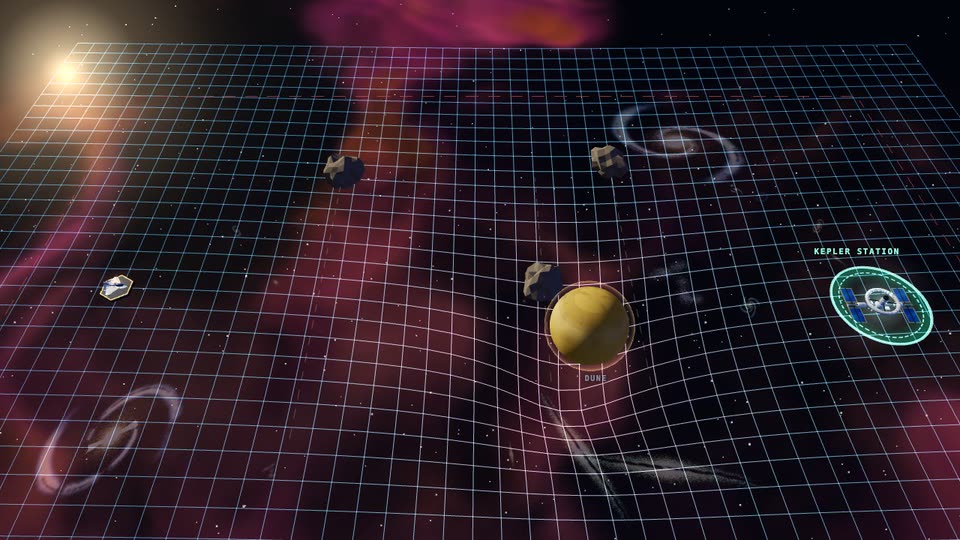
Tumbling rocks 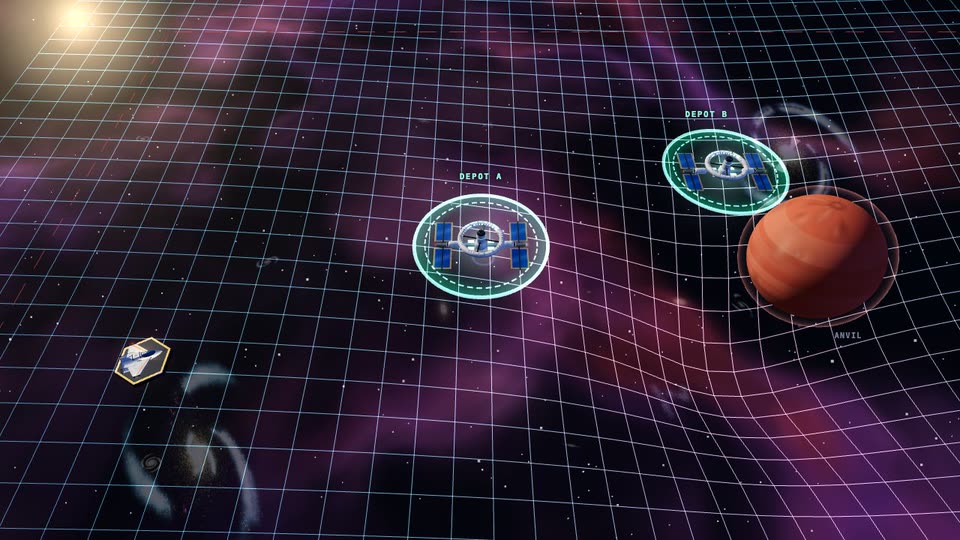
Two drops 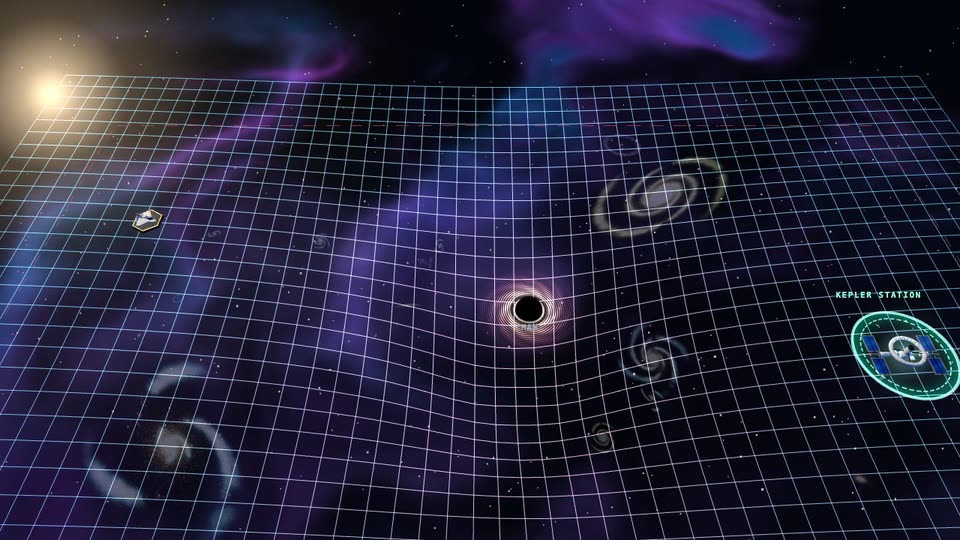
A black hole 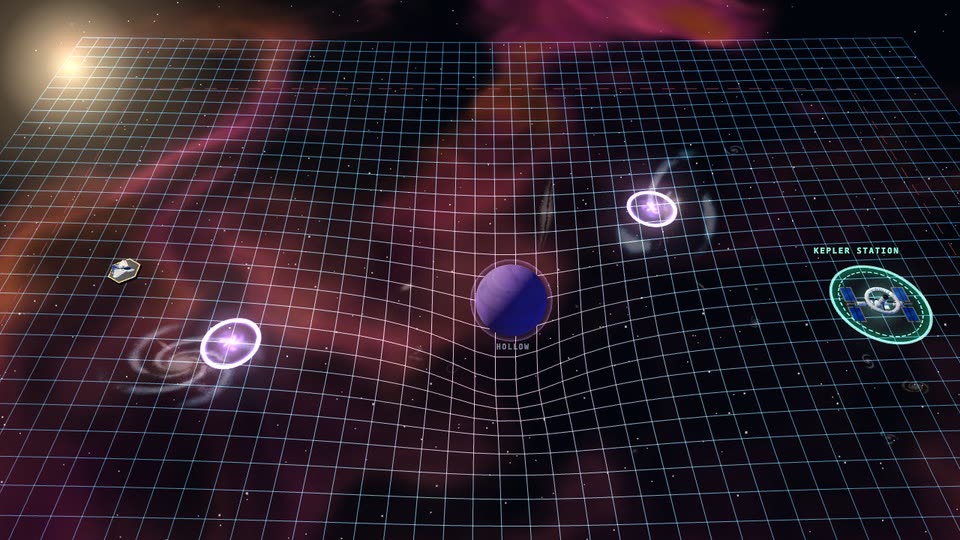
A wormhole, with its two mouths 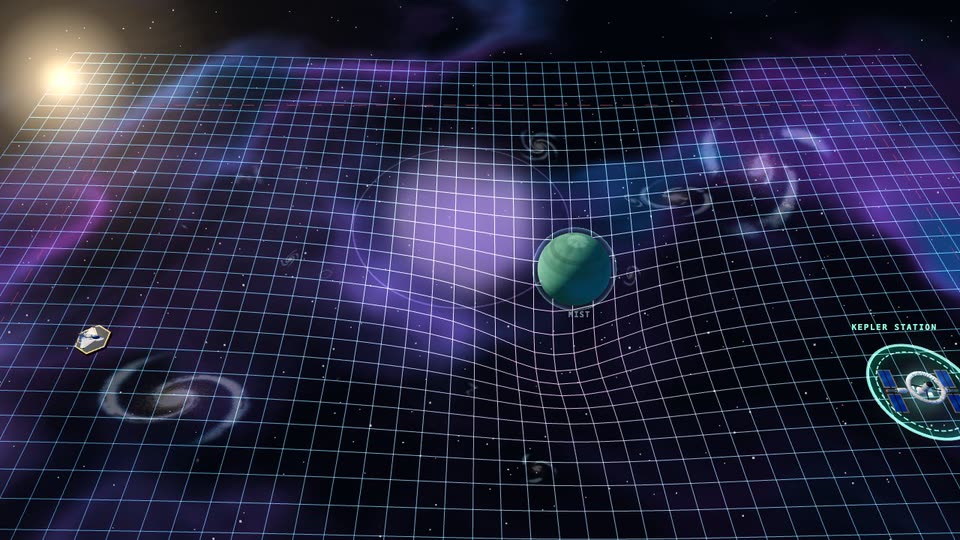
A cloud of dust 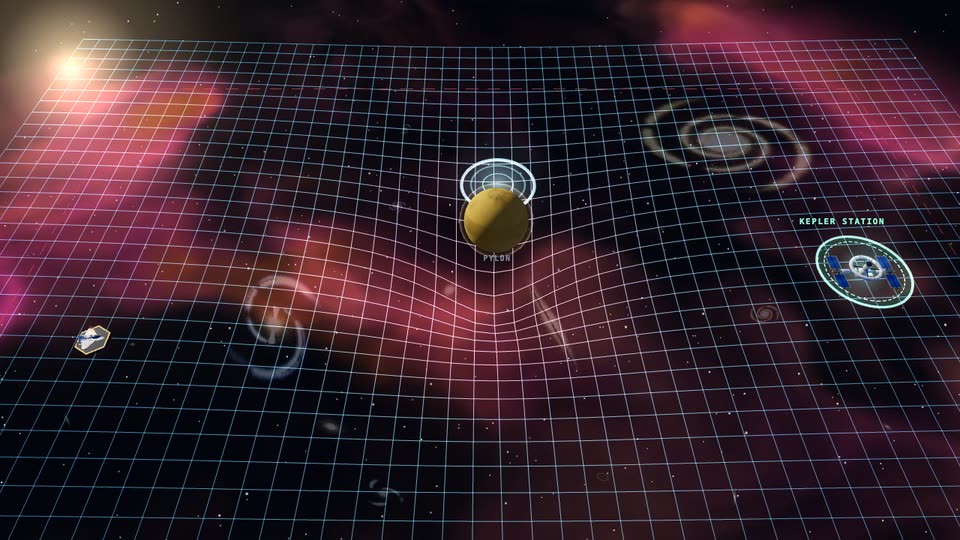
A boost ring 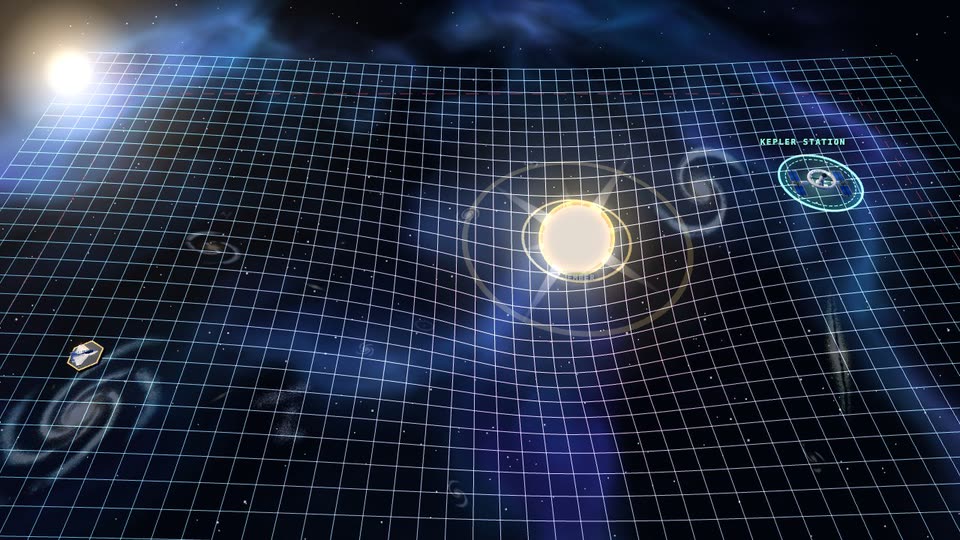
A pulsar
| Hazard | What it does | First seen |
|---|---|---|
| Repulsor star | A star that pushes instead of pulling. Steer round it, or let it bend your path. | Stage 6 |
| Tumbling rocks | Small, solid rocks with no pull of their own, circling a point or shuttling along a lane. Touch one and the flight is over. The dotted line shows where they will be. | Stage 7 |
| A moving station | A station on an orbit. Time the throw so you meet it, and remember that the dock speed is relative to it. | Stage 8 |
| Fragile cargo | Strong gravity wears the crate down. The Cargo figure falls and a strain bar shows the load. At zero the cargo shatters, so keep away from the deepest dips. | Stage 9 |
| Several drops | More than one station to deliver to in the same flight. | Stage 10 |
| Black hole | An enormous pull and a tiny deadly core. Safe at a distance, and a fine slingshot. | Stage 11 |
| Wormhole | Fly into one mouth and you leave by the other with the speed and direction you had. A short pause stops you bouncing straight back. On the last five stages the far side can be hidden in fog until you have been through. | Stage 12 |
| Drops in order | Several stations that must be served one after another. | Stage 14 |
| Nebula | A cloud of dust that drags on you. It slows you most at its heart and not at all at its rim. | Stage 21 |
| Boost ring | Fly through and you are kicked forward along your heading. | Stage 22 |
| Pulsar | A star whose pull beats like a heart, stronger and weaker in a rhythm. Time your pass. | Stage 23 |
| Binary black holes | Two black holes circling each other. | Stage 26 |
| The third dimension | Worlds above and below your lane, a pitch on your throw and a view you can turn. | Stage 31 |
| A tilted orbit | A moon, a black hole or a station whose orbit is tipped out of the flat plane, so it rises and falls as it goes round. | Stage 34 |
The nine sectors
The 45 stages come in nine sectors of five. Each one adds something new before it mixes everything together.
| Sector | Stages | What it adds |
|---|---|---|
| Training Orbit | 1–5 | Planets, moons and one clean throw. Learn the sling. |
| The Drift | 6–10 | Pushing stars, tumbling rocks, a moving depot, fragile crates and your first double delivery. Brake and steer arrive. |
| Deep Space | 11–15 | Black holes, wormholes and long multi-drop runs. |
| The Gauntlet | 16–20 | Everything at once, with less room for error. |
| The Veil | 21–25 | Dust that drags, stars that beat like hearts, and rings that throw you forward. |
| The Core | 26–30 | Black holes in orbit, rapids, timed portals and the longest haul: the hardest flat contracts of all. |
| Altitude | 31–35 | The third dimension. Worlds above and below the lane, a pitch to your throw and the vertical nudges. |
| The Void | 36–40 | Dust and rings you can pass over or under, pulsars on high, portals between decks, tilted orbits and the summit. |
| The Far Side | 41–45 | Wormholes you cannot see through until you have been through them, and docking thrusters to fly the last stretch by hand. All in three dimensions. |
A tenth, bonus sector waits after them: see the Archive.
The Archive: the bonus sector

After the nine sectors there is a tenth, the Archive, a bonus sector for completionists. It holds five more stages, 46 to 50: old contracts rewritten with a smaller depot, a lower speed limit at the dock and, on three of them, one nudge instead of two, so there is less room for error than the first time round. They are flat stages, like the first thirty, and they are part of the full game.
How it opens
The Archive is shut until you hold one of two badges: Full Sky (three stars on every stage of the nine sectors) or Hall of Medals (the bonus medal on every stage of the nine sectors). Either one is enough. The Archive’s own stages do not count towards those two badges, nor towards Master Courier, so the door never needs what is behind it.
While it is shut, its stages show a padlock, the stage list says what opens it, and pressing one tells you the same. The totals count only the nine sectors, 135 stars and 45 bonus medals. The game says THE ARCHIVE IS OPEN when you earn the badge, and from then on the totals count the Archive too, 150 stars and 50 bonus medals. If you finish stage 45 while it is shut, the results panel says what opens it and offers Play again in place of Next level, and an address such as #46 opens stage 1 instead.
The five stages
| Stage | No. | What waits there | Dock speed | Nudges | Bonus medal |
|---|---|---|---|---|---|
| Second Dance | 46 | The binary black holes again, and a rock shuttling through the gap on its own beat. | 13 wu/s | 2 | Skim a rock or a hole: one near miss |
| Pulse Rapids | 47 | Two boost rings, a bumper and a pulsar swelling and fading beside the lane. | 11 wu/s | 1 | No overshoot at the dock |
| Cold Orbit | 48 | Fragile cargo, a bank of dust and a depot that circles a pulsar. | 10 wu/s | 1 | Cargo above 90% |
| Three Doors | 49 | Three drops, in order, past a black hole and through a pulsar’s tides and a bank of dust. | 18 wu/s | 2 | All three with no nudge |
| The Last Archive | 50 | A black hole, a pulsar with a depot in orbit, dust, a boost ring and a wormhole. | 11 wu/s | 1 | Finish without using a nudge |
Deliver all five and you earn the Archivist badge, a gold one, and with it the Archive Silver hull paint in the Hangar.
The third dimension
From stage 31 the game leaves the flat plane. Worlds hang above and below your lane, and a throw has a height as well as a heading. The glowing grid is the floor. Thin lines drop from each world, station and your ship to rings on the floor, so you can tell how high things are, and an Altitude readout at the top right gives your own height. There is a floor at -45 and a ceiling at 75, and leaving that space is Lost in space like leaving the playfield on a flat stage.

Pitch
The pull still sets your heading and your power. A new setting, the pitch, tips the throw up or down, in whole degrees up to 75 either way. It starts at +8. While you aim:
- Press ↑ or ↓ to tip it one degree, and hold the key to keep going.
- Press E or Q to tip it three degrees up or down.
- Or drag the PITCH slider at the left of the screen.
The arrow keys and Q and E work with or without the mouse button held, and the dotted line follows the pitch as you change it. Once you have launched they go back to being nudges: E pushes up and Q pushes down, and the arrows boost and brake.
Turning the view
Until you touch it, the camera follows the ship. Take it and you get a free camera that circles the middle of the scene and always keeps facing it, so you can look at the stage from the side, from above or even from under the floor before you throw. The first move takes the camera exactly where it is, and it then stays where you leave it.
| Input | Keys | What it does |
|---|---|---|
| Trackpad or Magic Mouse | Two-finger swipe | Swipe right and the camera moves to its right, swipe up and it rises. A pinch zooms. |
| Mouse | Hold right mouse | Move the mouse: right moves the camera to its right, up lifts it. The wheel zooms. |
| One finger, no click | Hold Option | Hold Option (Alt) and slide a finger on the trackpad. An Option-click never starts an aim. |
| On the keys | W S A D | While the right button or Option is held: W and S move closer and back, D and A go round to the right and left, E and Q go up and down and Shift is faster. These keys do not nudge the ship then. |
| Touch screen | Two fingers | Drag both to move the camera round the scene and pinch to zoom. One finger still aims. |
F hands the camera back to the ship, and V puts the view back as it began.
The pilot view
The pilot view is a small window with the view from the ship’s nose, which starts at the top right. While you aim it looks along the launch you are lining up, so you can see what you are heading for, and in flight it shows what the ship sees. Under it are the heading and, on a 3D stage, the pitch. Behind the grid it shows the stars, galaxies and gas clouds all round the stage, on every stage, flat or 3D, and your launch pad is left out of the picture while the ship is sitting on it, so you can see straight through it to the floor. It is on when you first play. P or the PILOT button turns it off and on, the × on the window closes it and the ⤢ button makes it larger, from a third of the screen’s width to half of it. To move it, drag the thin strip along its top to wherever you like on the screen, and double-click that strip to send it back to the corner; the window always stays fully on the screen, even if you make the browser window smaller. The other panels (the contract box, the timer, the gauges, the round buttons, the hint bar and the stage buttons) slide out of its way when you drag it over them, and slide back when you move it off. The game remembers your choices, including where you put it. The window is left out on a phone-width screen, where there is no room for it.
Badges

There are 42 badges for challenges overcome, in bronze, silver and gold. The BADGES button or B opens the shelf, and the newest ones you have earned sit as small medallions at the top left of the screen. Some badges are worked out from your saved stars and medals, and some are won on the way, by how you deliver. The ones your saved stars already earn are awarded when you open the game.

When you earn badges, a card announces each one, best first. A click, Enter or Space moves on and Esc skips the rest. If you earn many at once the card shows three, and the results panel lists them all.
The journey
| Badge | What to do | Medal |
|---|---|---|
| First Delivery | Deliver your first crate. | Bronze |
| Orbit Graduate | Deliver every stage of sector 1. | Silver |
| Drift Runner | Deliver every stage of sector 2. | Silver |
| Deep Space Hauler | Deliver every stage of sector 3. | Silver |
| Gauntlet Survivor | Deliver every stage of sector 4. | Silver |
| Veil Walker | Deliver every stage of sector 5. | Silver |
| Core Breaker | Deliver every stage of sector 6. | Silver |
| Sky Climber | Deliver every stage of sector 7. | Silver |
| Summit Walker | Deliver every stage of sector 8. | Silver |
| Far Side Pilot | Deliver every stage of sector 9. | Silver |
| Archivist | Deliver every stage of the Archive. | Gold |
| Master Courier | Deliver every stage of the nine sectors. | Gold |
Stars and bonus challenges
| Badge | What to do | Medal |
|---|---|---|
| Constellation | Earn three stars on five stages. | Bronze |
| Starfield | Earn three stars on every stage of one sector. | Silver |
| Full Sky | Earn three stars on every stage of the nine sectors. | Gold |
| Medalist | Earn three bonus medals. | Bronze |
| Decorated | Earn ten bonus medals. | Silver |
| Hall of Medals | Earn the bonus medal on every stage of the nine sectors. | Gold |
Style
These are won by how you deliver a stage.
| Badge | What to do | Medal |
|---|---|---|
| One Throw | Deliver a stage with your first throw. | Bronze |
| Pure Throw | Deliver a stage that gives you two or more nudges without using one. | Bronze |
| Soft Touch | Dock at a third of the speed limit or less. | Silver |
| Quick Hands | Deliver in less than 40% of the stage's time limit. | Silver |
| Close Shave | Make three near misses in one flight and still deliver. | Silver |
| Elevator | Deliver a 3D stage using an up or a down nudge on the way. | Bronze |
| High Flyer | Fly above 50 and still deliver. | Silver |
| Deep Diver | Dive below -15 and still deliver. | Silver |
| Never Give Up | Deliver a stage after five failed throws in a row. | Bronze |
Hazards
One badge for each kind of hazard you get across, and a gold one for all of them.
| Badge | What to do | Medal |
|---|---|---|
| Pinball | Win a stage with a repulsor star. | Bronze |
| Rock Dancer | Win a stage with tumbling rocks. | Bronze |
| Moving Target | Win a stage where the station is on the move. | Bronze |
| Milk Runner | Win a stage with more than one drop. | Bronze |
| In Order | Win a stage whose drops must be made in order. | Silver |
| Steady Hands | Win a fragile-cargo stage with the crate above 90%. | Silver |
| Horizon Walker | Win a stage with a black hole. | Silver |
| Binary Dancer | Win a stage with two black holes circling each other. | Gold |
| Pulse Reader | Win a stage with a pulsar. | Silver |
| Portal Hopper | Win a stage by going through a wormhole. | Bronze |
| Fog Pilot | Win a stage by flying through a nebula. | Bronze |
| Overdrive | Win a stage by flying through a boost ring. | Bronze |
| Third Dimension | Win a stage in three dimensions. | Bronze |
| Tilted Orbit | Win a stage with a moon, a black hole or a station on a tilted orbit. | Silver |
| Hazard Master | Earn every hazard badge. | Gold |
The Hangar

The HANGAR button, or H, opens the Hangar: looks for your shuttle that badges unlock. There are three slots, the hull paint, the flight trail behind the shuttle and the cargo crate strapped on top, and a preview at the top shows what you have chosen. Every slot has a standard look that is always yours, and 23 more looks, each unlocked by one badge, so there is nothing to learn but “earn this badge, get this look”. A look you have earned is a card you can click to use; a locked one says which badge unlocks it.
A look never changes how a stage plays: no stage is easier or harder, and no star or badge depends on it. When a delivery earns a badge that unlocks a look, the results panel says so and offers to open the Hangar. Your choice is kept in this browser, and with an account it is kept on the account, so it follows you to any browser; a look only stays in use while you hold the badge that unlocks it.
Hull paint
| Look | Unlocked by the badge |
|---|---|
| Standard issue | Always yours |
| Orbit Blue | Orbit Graduate |
| Drift Teal | Drift Runner |
| Deep Violet | Deep Space Hauler |
| Gauntlet Red | Gauntlet Survivor |
| Veil Green | Veil Walker |
| Core Ember | Core Breaker |
| Sky Amber | Sky Climber |
| Summit Ice | Summit Walker |
| Far Side Obsidian | Far Side Pilot |
| Courier Gold | Master Courier |
| Archive Silver | Archivist |
Flight trails
| Look | Unlocked by the badge |
|---|---|
| Ion trail | Always yours |
| Starlight | Constellation |
| Stardust | Starfield |
| Full Spectrum | Full Sky |
| Featherlight | Soft Touch |
| Lightning | Quick Hands |
| Razor | Close Shave |
| Phoenix | Never Give Up |
Cargo crates
| Look | Unlocked by the badge |
|---|---|
| Medical pod | Always yours |
| Bronze crate | Medalist |
| Silver crate | Decorated |
| Gold crate | Hall of Medals |
| Glass crate | Steady Hands |
| Hazard crate | Hazard Master |
Saving, accounts and sharing
- The game saves itself. Your best stars and bonus medals on every stage, your badges, the ghosts of your best runs and your settings are kept in this browser as you play.
- With an account, your stars, badges and Hangar choice are kept on your Oakenhearth account as well, so they follow you to any browser. The ghosts and the settings stay in the browser they were made in.
- As a guest, stage 1 is free and everything you earn is kept in this browser. If you make an account afterwards, it joins the account. The full game you buy belongs to the account, not to the browser.
- Your settings (music on or off, the pilot view and its size and place, the ghost) are remembered in this browser.
- Sharing. The ⤴ button in the game, and the Share button on the results panel, open a small window with a button for Facebook, X, Reddit, WhatsApp, Bluesky, LinkedIn, Telegram and email, and a Copy link button (and More options, on a phone or a Mac that has a share sheet of its own). Each site’s button opens that site in a new tab with the post ready to send: a link to Courier, and, from the results panel, a line saying which stage you delivered and how many stars you won, with no spoilers. Nothing is sent to us and nothing is loaded from those sites until you press their button.
- Sound. The music and every sound are made by the game itself as it runs, and change with the stage. M or the ♪ button turns them off and on.
You can jump to a stage by its address: the end of the game’s address says which stage it opens, for example #7 for stage 7 (a stage you cannot play yet will ask you to sign up first).
Tips
- Think past the end of the dotted line. It shows only the first few seconds. Ask where the planets will pull you after that.
- Use Shift. A fine aim is the difference between a near miss and a dock on the narrow stages.
- Speed is energy. You speed up falling into a well and slow down climbing out. If you must arrive slowly, plan to arrive climbing out of a well, or keep a brake nudge.
- Retry freely. The clock starts at launch, so R costs nothing, and the ghost of your best run shows you where to gain time.
- Save your nudges. Three stars want one or two unused, so aim well enough that a nudge is only for emergencies, and spend one without a second thought when the alternative is missing the station.
- Read the contract when a stage seems odd. The bonus line says what the stage rewards, and most stages carry a tip.
- Go for three stars first, and the bonus medal after. They are different challenges and sometimes pull in opposite directions.
- On 3D stages, look before you throw. Swing the camera round to see how the worlds sit above and below your lane, and use the pilot view to line up what you are heading for.
- Stuck? Once you have an account you can play any stage you have open in any order, so go and do another, and come back with a clearer head.
Ready?
The station is waiting and the first ten stages are free, stage 1 with no account to make first.